
Description
SanDisk iXpand Flash Drive Flip 256GB – Premium Storage for iPhone and Computer
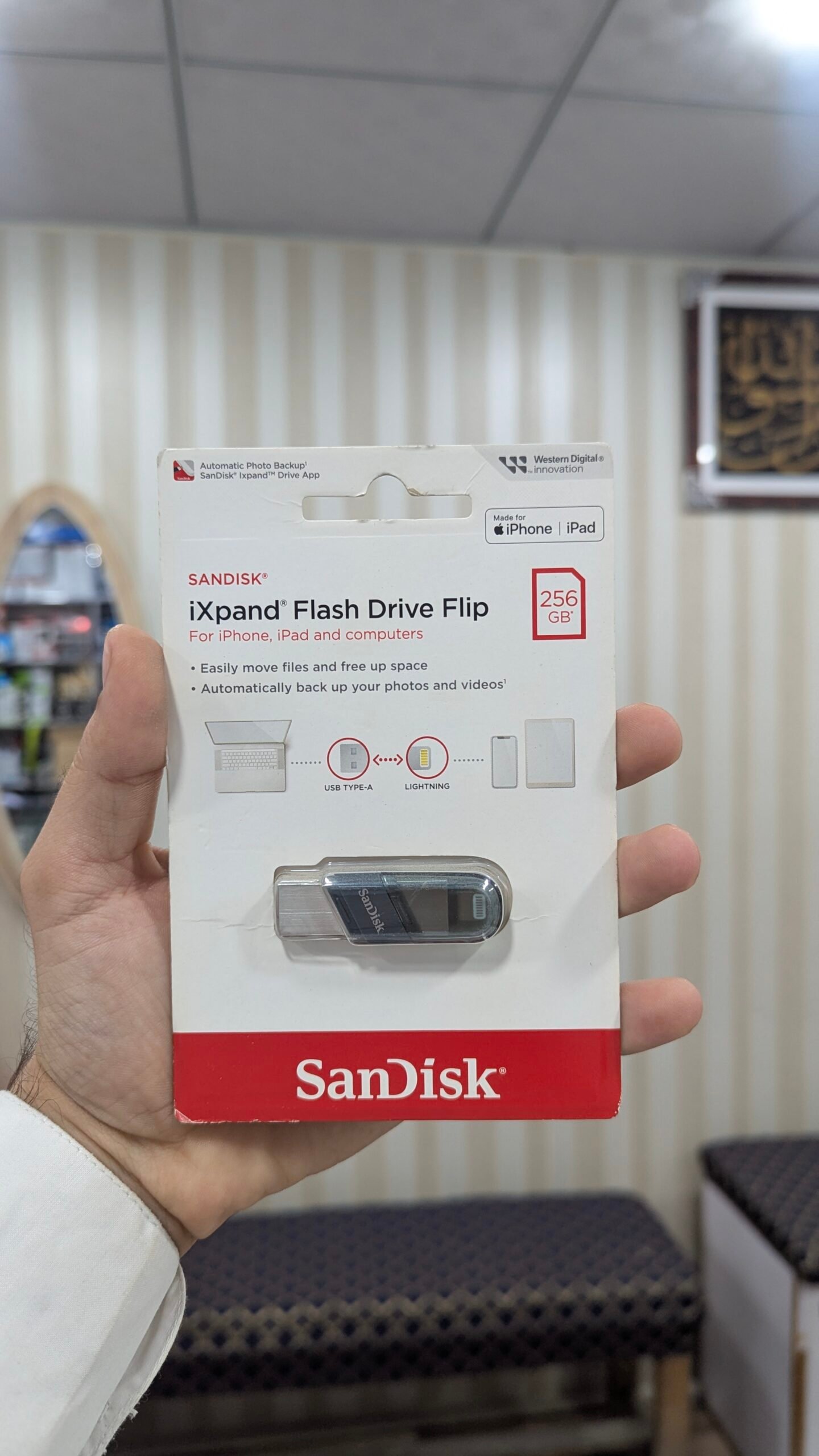
Running out of storage on your iPhone? The SanDisk iXpand Flash Drive Flip 256GB provides a convenient way to transfer files between compatible iPhone or iPad devices and computers. With its dual-connector design, you can move photos, videos, documents, and other files using Lightning and USB Type-A connections.
Whether you want to free up space on your iPhone, back up important memories, or transfer files to your computer, this SanDisk flash drive offers a practical storage solution for everyday use.
Table of Contents
- Key Features
- Why Choose This Flash Drive
- Compatibility
- How to Use
- Specifications
- Frequently Asked Questions
SanDisk iXpand Flash Drive Flip 256GB Key Features
The SanDisk iXpand Flash Drive Flip 256GB combines two connector types in a compact flash drive. Its design allows users to transfer content between compatible Apple devices and computers with USB Type-A ports.
1. 256GB Storage Capacity
With 256GB of storage capacity, this flash drive offers space for photos, videos, documents, and other personal files.
The actual usable storage capacity may be lower than the advertised capacity because some storage is used for formatting and system requirements.
2. Dual-Connector Design
The drive features a Lightning connector and a USB Type-A connector.
This makes it suitable for transferring files between compatible Lightning-equipped iPhones or iPads and computers that support USB Type-A connections.
Important: This product uses a Lightning connector, not USB-C. Check your device’s port before purchasing.
3. Free Up iPhone Storage
Large photo and video collections can occupy considerable space on your iPhone. The drive can help you move files to external storage, allowing you to manage your available device storage.
The SanDisk iXpand Drive app is required for supported iPhone and iPad functionality.
4. Automatic Photo and Video Backup
The iXpand Drive app supports automatic backup of photos and videos when configured in the app settings.
This can help you maintain an additional copy of important memories. Backup settings and supported functionality depend on your device and software version.
5. Convenient Flip Design
The Flip design allows the connector cover to protect the Lightning connector. The cap can also be positioned on the USB Type-A side while the drive is being used.
This provides a practical way to manage the two connectors during file transfers.
Why Choose the SanDisk iXpand Flash Drive Flip 256GB?
Easy File Transfer Between Devices
Moving files between an iPhone and computer can be inconvenient when relying on cloud storage or messaging applications. The dual-connector design provides a direct way to transfer files using compatible ports.
You can use the drive for documents, photos, videos, and other supported files.
Useful for Photos and Videos
If your iPhone storage is becoming limited, moving older photos and videos to external storage may help you manage space.
Always verify that your files have transferred successfully before deleting them from your phone.
Compact Storage Solution
The SanDisk iXpand Flash Drive Flip 256GB is designed for portable use. Its compact construction makes it suitable for carrying between home, office, and other locations.
It can be useful for students, professionals, content creators, and everyday smartphone users who need file-transfer flexibility.
Compatibility
iPhone and iPad
The flash drive is designed for compatible iPhone and iPad devices with Lightning connectors.
Apple device compatibility should be checked before purchase. Some newer Apple devices use USB-C rather than Lightning.
Windows Computers
SanDisk lists Windows 10+ compatibility for this product line.
Your computer must have a compatible USB Type-A connection or an appropriate adapter.
Mac Computers
The product supports macOS 10.9+ according to the manufacturer’s specifications.
Check your computer’s available ports and operating system before use.
Compatibility reference: SanDisk iXpand Compatibility Support
How to Use the SanDisk iXpand Flash Drive Flip 256GB
Step 1: Connect the Drive
Insert the Lightning connector into a compatible iPhone or iPad.
Step 2: Install the App
Install the official SanDisk iXpand Drive app from the Apple App Store if required for your device.
Step 3: Manage Your Files
Follow the app’s instructions to access, transfer, or back up supported files.
Step 4: Transfer Files to a Computer
Connect the USB Type-A side to a compatible computer and manage your files.
The exact steps and supported functions may vary depending on your device and software.
Specifications
| Specification | Details |
|---|---|
| Brand | SanDisk |
| Model | iXpand Flash Drive Flip |
| Capacity | 256GB |
| Connector 1 | Lightning |
| Connector 2 | USB Type-A |
| Interface | USB 3.1 Gen 1 |
| Dimensions | 65.4 × 15.2 × 8.7 mm |
| Weight | Approximately 20g |
| Operating Temperature | 0°C to 35°C |
| Warranty | 2-Year Limited Warranty (manufacturer specification) |
Specifications based on SanDisk’s official product documentation.
Frequently Asked Questions (FAQs)
1. What is the SanDisk iXpand Flash Drive Flip 256GB?
It is a dual-connector flash drive designed to transfer and store files between compatible Lightning-equipped Apple devices and computers with USB Type-A ports.
2. Does it work with every iPhone?
No. Compatibility depends on the iPhone model, connector, and software requirements. Check compatibility before purchasing.
3. Does it support USB-C iPhones?
This model features a Lightning connector. It is not a native USB-C flash drive. Verify your iPhone’s connector before ordering.
4. Can I back up photos and videos?
Yes, supported backup functionality is available through the SanDisk iXpand Drive app. Configure automatic backup within the app when supported.
5. Does it work with Windows computers?
SanDisk lists Windows 10+ compatibility. Your computer must support the required USB connection.
6. Is 256GB the actual usable storage?
The advertised capacity is 256GB. Actual usable capacity is lower due to formatting and other storage requirements.
7. Is the product suitable for iPhone storage management?
It can help you transfer files away from your iPhone and manage available storage, subject to device and app compatibility.